
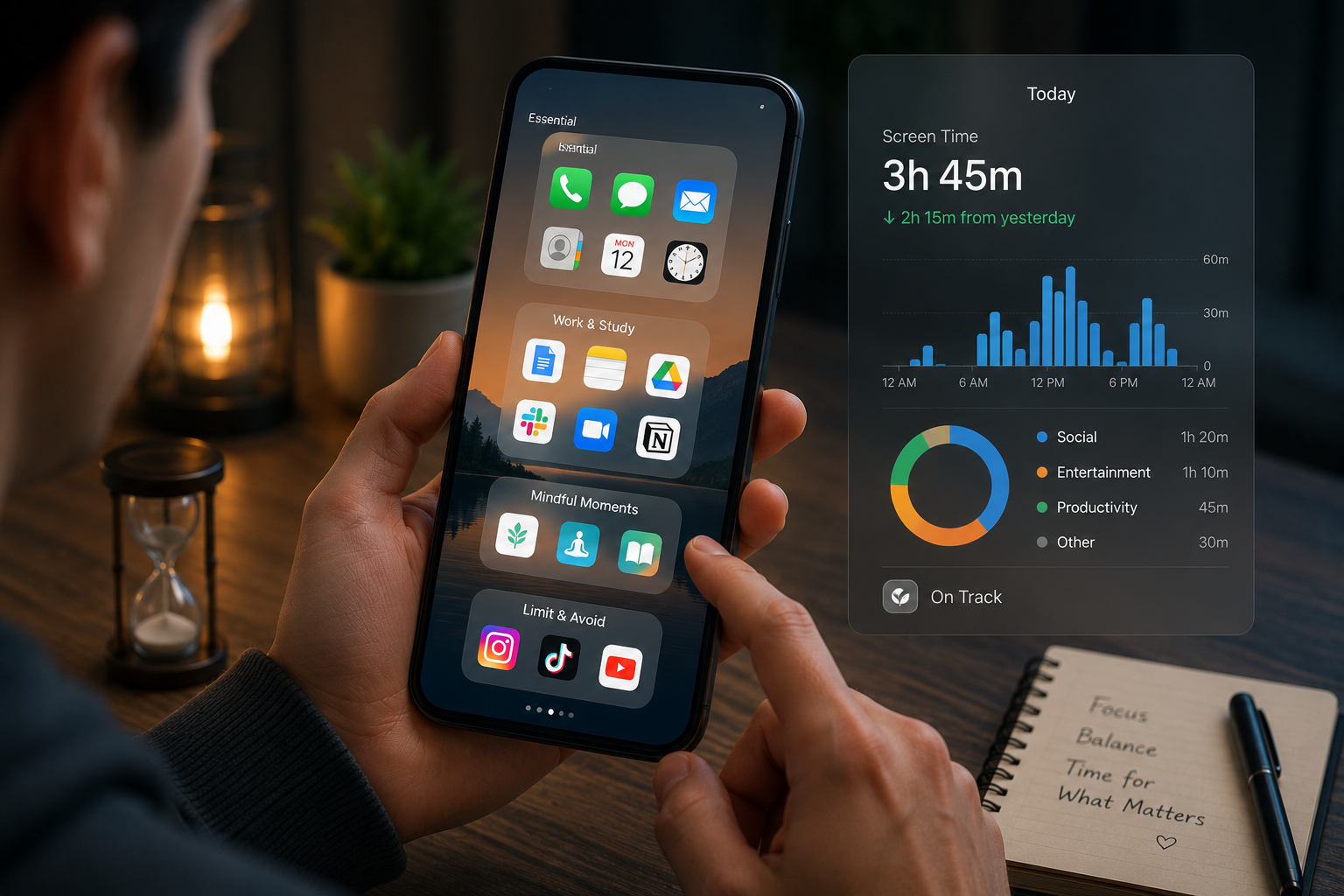
Most people do not spend extra hours on their phones because they planned to. It usually happens in small moments—unlocking the phone to check one message, opening a social app for a quick update, or picking up the device during a short break and losing twenty minutes without noticing.
The issue is often not the phone itself, but how apps are placed and how daily habits are built around them.
Smartphones are designed for convenience. Frequently used apps are placed within easy reach, notifications pull attention instantly, and endless scrolling makes stopping feel harder than starting. When entertainment apps sit on the home screen, and work or health-related tools stay hidden in folders, the device quietly trains behavior in the wrong direction.
Reducing screen time does not require deleting every app or using extreme digital detox methods. Small changes in app placement, notification control, and usage routines can create a major difference without making the phone feel difficult to use.
This guide explains how to reduce screen time by reorganizing apps, building better usage habits, and creating a phone setup that supports focus instead of constant distraction.
Why App Placement Affects Screen Time More Than People Realize
Most phone habits are automatic, not intentional.
People rarely think before tapping the same app dozens of times per day. The brain responds to visual cues, convenience, and repetition.
If you place social media, short videos, shopping apps, or games directly on the first home screen, opening them becomes almost automatic.
The Power of Friction
Small obstacles can significantly reduce unnecessary usage.
For example:
- moving an app into a folder
- placing it on the second or third screen
- removing it from the home screen entirely
- requiring a manual search to open it
These small changes create just enough pause to interrupt mindless habits.
That pause helps the brain ask an important question:
“Do I actually need to open this right now?”
Convenience Shapes Behavior
People use what is easiest to access.
If calendar apps, note-taking tools, reading apps, or fitness trackers are easier to reach than entertainment apps, people often improve their behavior naturally without forced discipline.
The goal is not restriction. It is a better design.
Identify Which Apps Actually Waste Time
Before changing the layout, it helps to understand where time is really going.
Many people assume one app is the problem, but the real issue is often spread across several small habits.
Check Screen Time Reports
Most smartphones provide built-in screen time tracking.
Look for:
- daily usage hours
- most-used apps
- number of pickups
- notification frequency
- late-night usage patterns
This approach creates a clearer picture than guessing.
Sometimes messaging apps, browsing, or shopping apps consume more time than expected.
Separate Useful Time from Passive Time
Not all screen time is detrimental.
Useful screen time includes:
- work communication
- navigation
- banking
- learning
- reading
- scheduling
- health tracking
Passive screen time usually includes the following:
- endless scrolling
- repeated checking
- unnecessary browsing
- opening apps from boredom
The goal is to reduce low-value use, not to remove beneficial technology.
Rebuild the Home Screen for Better Habits
The home screen should support priorities, not distractions.
Keep the First Screen Purpose-Driven
The first screen should contain tools that improve daily function.
Good examples include:
- calendar
- notes
- reminders
- weather
- banking
- maps
- health apps
- reading apps
These support intentional phone use.
Move High-Distraction Apps Away
Apps like:
- short video platforms
- social media
- shopping apps
- games
- streaming apps
It should be moved away from the first screen.
Some people place them inside a folder with a neutral name, like
“Optional”
This reduces emotional triggers compared to bright, attention-grabbing icons.
Remove Unused Apps Completely
Many people keep apps they barely use.
Unused apps create clutter, visual temptation, and background notifications.
Deleting them improves both focus and storage management.
Use Notification Control Instead of Constant Alerts
Notifications are one of the biggest reasons people unlock their phones unnecessarily.
Even useful apps become distractions when alerts are unmanaged.
Turn Off Non-Essential Notifications
Good candidates for disabling:
- shopping promotions
- news alerts
- game reminders
- social media engagement alerts
- entertainment recommendations
These rarely require immediate attention.
Keep Only Priority Notifications Active
Usually worth keeping:
- calls
- messages from important contacts
- calendar reminders
- banking security alerts
- delivery updates when relevant
- work communication if necessary
The phone should interrupt only when something truly matters.
Use scheduled notification review.
Instead of reacting instantly all day, check messages during planned times.
This improves focus and reduces emotional interruption.
Create Better Opening and Closing Phone Habits
Screen time often increases because of specific daily routines.
Morning and nighttime usage are especially important.
Avoid Starting the Day with Social Apps
Opening social media immediately after waking often creates a reactive mindset.
A better first screen habit:
- check calendar
- review tasks
- read notes
- confirm schedule
This supports intention instead of distraction.
Build a Clear Evening Shutdown Routine
Late-night screen time usually happens without planning.
Moving entertainment apps away from the home screen helps, but routines matter more.
Helpful habits include:
- charging the phone away from the bed
- setting app cut-off times
- using reading or sleep tools instead of scrolling
Better endings improve both sleep and next-day focus.
Use App Limits Carefully
App timers can help, but they work best when paired with real behavior changes.
Why App Limits Sometimes Fail
People often tap “ignore limit” without thinking.
This happens when the phone setup stays the same and only the timer changes.
Limits work better when combined with:
- app relocation
- notification control
- replacement habits
- clear usage goals
Better Use of App Limits
Instead of setting unrealistic rules like
“Only 15 minutes for all social apps.”
Try practical limits such as the following:
- No social apps before 10 AM
- No entertainment apps during work hours
- Shopping apps are only available on weekends
Behavior-based limits often work better than strict minute counting.
Replace Scroll Habits with Better Alternatives
Removing a habit works better when something replaces it.
Space often gets filled by the old behavior again.
Strong Replacement Options
Instead of opening random apps, use:
- saved reading lists
- note apps for quick ideas
- audiobook apps
- podcasts
- language learning tools
- health tracking apps
- journaling apps
The goal is not perfection. It is moving from passive use to intentional use.
Make Better Options Easier
If the reading app is hidden but entertainment apps are visible, the easier habit wins.
Place productive alternatives where distraction used to be.
Environment shapes behavior.
Step-by-Step Reset for Lower Screen Time
Changing everything at once usually fails.
A practical reset works better.
Step 1: Review Weekly Screen Time
Identify the top three time-consuming apps.
Step 2: Reorganize the First Home Screen
Keep only essential daily tools visible.
Step 3: Move Distraction Apps to a Secondary Screen
Add small friction before opening them.
Step 4: Turn Off Unnecessary Notifications
Protect attention from constant interruptions.
Step 5: Create Morning and Night Rules
Start and end the day with structure.
Step 6: Use App Limits for High-Risk Habits
Focus on realistic boundaries.
Step 7: Replace One Scroll Habit
Swap one passive habit for one useful alternative.
Consistency matters more than aggressive restriction.
Common Mistakes That Make Screen Time Worse
Some “productivity fixes” create frustration without solving the real issue.
Deleting Everything at Once
Extreme digital detox plans often fail quickly.
Sustainable improvement works better than short-term strictness.
Keeping Notifications On for “Just in Case”
Most alerts are not urgent.
Constant checking damages focus more than people realize.
Using Productivity Apps Without Changing Behavior
Downloading a focus app does not help if distractions remain unchanged.
System design matters more than new tools.
Hiding Problems Instead of Measuring Them
Ignoring screen time reports prevents real improvement.
Clear awareness is necessary before change.
Replacing One Distraction with Another
Removing social media but spending hours on shopping apps does not solve the problem.
Look at the behavior, not just the app name.
Expert Recommendations for Long-Term Digital Balance
Reducing screen time should improve life, not create stress.
Design the Phone Around Priorities
The phone should reflect what matters most:
- work
- family
- health
- learning
- focus
Not just what is easiest to tap.
Review App Layout Every Few Months
Habits change, and apps slowly rebuild old patterns.
Regular reviews keep the system intentional.
Protect Privacy While Reducing Usage
Many high-engagement apps also collect large amounts of behavioral data.
Reducing unnecessary app use often improves both focus and digital privacy.
Use One Device-Free Zone
Examples include:
- the dining table
- the bedroom
- focused work sessions
Physical boundaries support digital boundaries.
Keep Progress Realistic
The goal is not zero screen time.
It is using the phone with a purpose instead of an automatic habit.
That difference matters far more.
Before vs After: What Usually Changes
Before improving app placement:
- constant phone checking
- unplanned scrolling
- delayed work tasks
- late-night screen habits
- higher mental fatigue
- more interruptions during focus
After better app organization and habits:
- fewer unnecessary unlocks
- stronger attention during work
- cleaner morning and evening routines
- better awareness of phone usage
- improved sleep habits
- less emotional distraction from constant alerts
The biggest improvement is often mental clarity, not just lower screen time numbers.
FAQs
Does moving apps really reduce screen time?
Yes. Small friction changes behavior. When distracting apps are harder to reach, people are less likely to open them automatically without purpose.
Should I delete social media apps completely?
Not always. For many people, better placement and notification control work better than full deletion. The goal is intentional use, not unnecessary restriction.
Are screen time reports accurate enough to trust?
They are usually accurate enough to reveal strong patterns. Even if exact minutes vary slightly, they clearly show which apps are consuming the most attention.
What is the best first home screen setup?
The best setup includes tools you genuinely need daily—a calendar, notes, reminders, email, health apps, and practical utilities. Entertainment apps should not dominate the first screen.
How long does it take to notice improvement?
Many people notice changes within a few days after reorganizing apps and adjusting notifications. Stronger habit changes usually become easier after consistent use for a few weeks.
Conclusion
Reducing screen time is rarely about willpower alone. Most phone habits are shaped by convenience, visual triggers, and repeated routines.
When distraction apps are the easiest things to open, unnecessary screen time becomes automatic. When the home screen supports useful actions instead, better habits become easier to maintain.
Improving app placement, controlling notifications, creating stronger morning and evening routines, and replacing passive scrolling with intentional alternatives can significantly reduce phone dependency without making technology feel restrictive.
The best phone setup is not the one with the most apps or the strictest limits. It is the one that helps daily life feel calmer, clearer, and more focused.
Small layout changes often create the biggest long-term results.